
Price
$27.00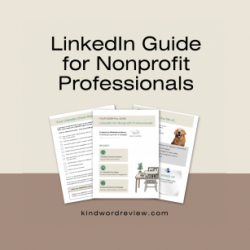 Guide
Guide
500,000+ nonprofit professionals trained since 2008
Created by Madeleine Nance, Fundraising Copywriter & Strategist
Five plug-and-play LinkedIn post frameworks (plus algorithm tips) to help nonprofit leaders post with confidence... So the people who could fund your work see you pop up on their feed and think, "Wow, tell me more!"
This guide gives you FIVE emotive LinkedIn post frameworks:
Inside this LinkedIn content system:
✅ How to use emotive content to sound human against AI-generated posts
✅ 5 ready-to-use post templates — best-performing formats that make people smile, cry, shout, think, and ask
✅ Examples for each post type — see exactly how it's done, then adapt for your organization
✅ Executive Director strategy — how leaders can use personal profiles to grow support for their mission
✅ Checklist of bonus tips for working the LinkedIn algorithm, so you get more eyes on your posts
These frameworks are for you if:
...because you know this will raise you more funds!
Grab the LinkedIn Guide for Nonprofit Leaders now

If you’re not completely satisfied, let us know within seven days after the webinar. We’ll help you choose another CharityHowTo webinar or workshop and apply the full amount of your purchase as a credit—or, if you prefer, refund 100% of your purchase.
